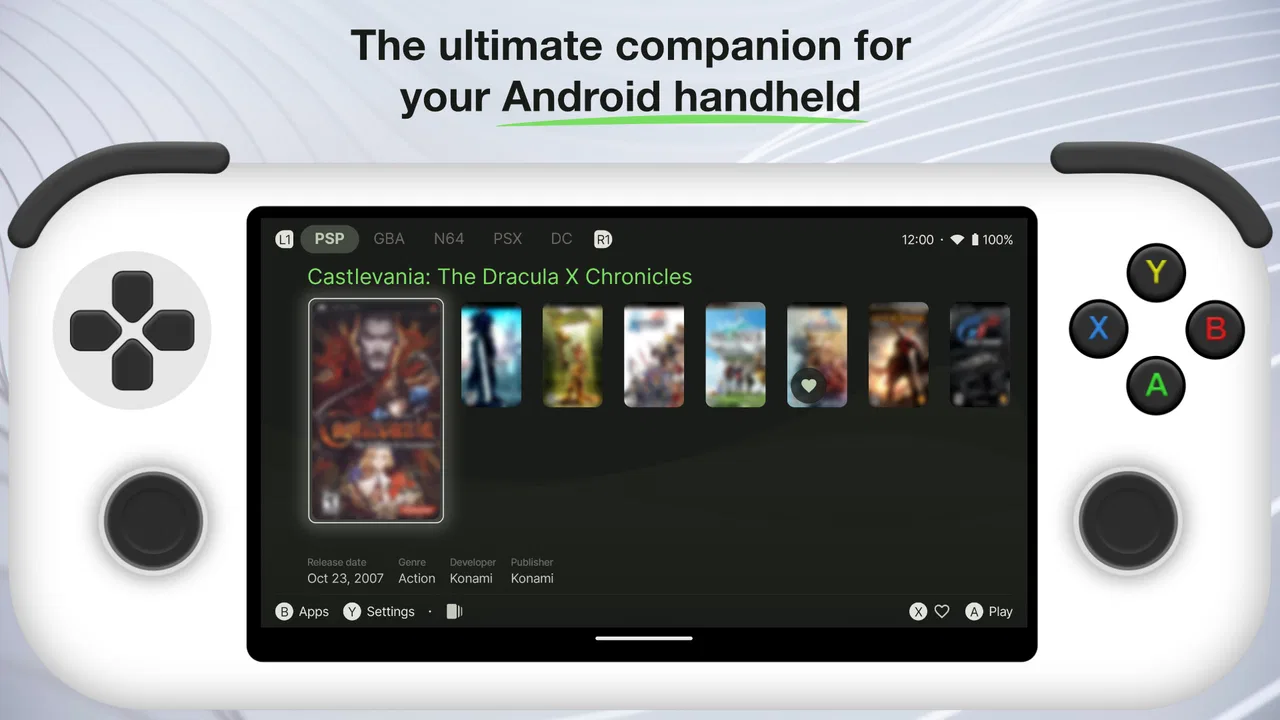
Beacon Game Launcher
- 4.3
- Rating
- 10.00K
- Installs
- $2.99
- Price

 Analysis by App-foxy
I spent time with Beacon Game Launcher as a way to turn an Android device into a more focused gaming space, and my first impression was that it makes the most sense when a phone or tablet is shared, handed around, or used for more than one person’s entertainment. It is a paid personalization app from NERDS TAKE OVER, priced at $2.99, with a simple goal: make gaming feel less like hunting through a general-purpose device and more like opening a dedicated console interface.
That idea sounds small, but it changes how I approach a device. Instead of moving between the regular home screen, folders, recent apps, and notifications, I can treat the launcher as the starting point for play. The appeal is not that it replaces the games themselves. It organizes the doorway into them. For someone who wants a cleaner gaming routine, that distinction matters.
How Beacon fits into a shared device
The most convincing use case for me is a household tablet or phone that several people use at different times. One person may use it for videos, another for school or browsing, and someone else may want it mainly for games. A game launcher gives that last activity a recognizable place without requiring every game to be scattered across the normal home screen.
You May Also Like

 Pandora - Music & Podcasts
Pandora’s Music Is Easy to Start, but Harder to Recover
Pandora’s strength is its low-effort path from a seed to a station. Its weak spot is how much confidence it asks you to place in connection, setup, and quiet recovery.

 AccuWeather: Weather Radar
AccuWeather Review: A Quick, Clear Forecast for Everyday Decisions
For everyday plans, the best forecast is the one you can understand quickly. AccuWeather makes rain timing, radar, and local conditions easy to act on, with a few trade-offs.

 Hill Climb Racing
Why Hill Climb Racing Still Turns Crashes Into One More Run
A tiny car, a bumpy hill and one more upgrade: Hill Climb Racing keeps resurfacing because its simple chaos makes every near-miss feel personal.

 AliExpress - Shopping App
AliExpress Makes Global Shopping Feel Personal, but Shoppers Bear the Risk
AliExpress turns a global marketplace into a pocket-sized discovery engine. Its reach is useful, its shopping loop compelling, and its trade-offs easy to miss.

 Lords Mobile: Kingdom Wars
Lords Mobile Is a Kingdom-Building Routine, Not a Quick Match
A case-by-case verdict on the building, battles, device demands, and social commitments that make Lords Mobile rewarding for some players and exhausting for others.

 PDF Scanner app - TapScanner
TapScanner Makes Paperwork Easier to Capture, Check, and Share
TapScanner makes scanning with a phone feel less like a rescue operation and more like a dependable step in getting work done. Its capture tools are useful, though not flawless.
More From Our News Desk
View All News


In that situation, I would not think of Beacon as a family-management tool. It is better understood as a gaming-focused front end. It can help people find the games they already use, but it does not turn a shared device into separate personal accounts or create household boundaries by itself. That is an important distinction before paying for it.
A realistic evening example is easy to imagine. A tablet sits on a coffee table, and one person has finished watching something. The next user opens the device and wants to play. With a launcher arranged around games, the handoff is more direct: the user starts from the gaming environment rather than sorting through someone else’s general apps. That does not solve every shared-device problem, but it reduces the small amount of friction that often makes a device feel cluttered.
I also like the idea for a device kept in a living room, guest room, or travel bag. The launcher gives that hardware a clearer identity. If the device is primarily for casual play, Beacon can make the purpose obvious without needing a separate console. For a dedicated personal phone, the benefit depends much more on how often I play and how much I dislike the standard Android home screen.
What the console-style approach changes
The usual Android launcher is designed to expose everything: communication tools, utilities, social apps, settings, and whatever was installed recently. That is useful for general productivity, but it is not always pleasant when I want to play immediately. Beacon’s value comes from narrowing my attention toward games and making the device feel more intentional.
Compared with manually creating a games folder, the launcher approach feels more like a mode than a storage trick. A folder still leaves the rest of the phone in charge of the experience. A game-oriented launcher changes the first impression and the route I take to start playing. That is the strongest reason to choose it over a free folder or a standard home-screen arrangement.
There is also a trade-off. The more specialized the home environment becomes, the less convenient it may be for someone who constantly jumps between gaming, messaging, browsing, and work. If I need to answer a notification, check a calendar, and launch a game within a minute, the regular launcher may be faster overall. Beacon is most useful when gaming deserves its own starting point rather than being one task among many.
Setting boundaries before handing over the device
For shared use, I would set expectations before installing it. Beacon can organize access to games, but the device’s broader Android behavior still matters. I would decide who is allowed to change the launcher, rearrange the experience, install games, or use other apps outside the gaming area. Those are household decisions, not things I would assume a personalization app handles automatically.
This is especially important when the device is used by children. The Everyone content rating makes the app itself broadly suitable from an age-label perspective, but that should not be confused with every game or app reachable from the device being suitable for every child. I would still review the installed games and the device’s existing account and purchase arrangements separately.
That separation is one of the most useful practical lessons from using a launcher like this: organization is not the same as access control. Beacon can make a collection easier to reach, but I would not rely on its presence as proof that a child cannot leave the gaming area, change settings, or interact with other parts of Android. Parents and owners should establish those boundaries with the device’s own tools and with clear household rules.
I would also avoid treating the launcher as a personal profile system. If two people share one device, the interface may help them find games, but it does not automatically separate progress, preferences, purchases, or recommendations. Those boundaries usually belong to the individual games and the accounts connected to them. Before switching users, I would check whether a particular game saves locally or through an account, because the launcher itself is not a substitute for that arrangement.
Coordination becomes easier, but not automatic
One overlooked benefit of a dedicated game space is coordination. In a household, people often need to know what is installed, what is ready to play, and whether a device is being used for a quick session or a longer one. A recognizable game-focused screen can make that conversation simpler. Someone can say they are using the gaming setup without making the device’s entire home screen part of the discussion.
It can also help when a device moves between rooms. If the tablet is passed from one person to another, the next user sees a consistent starting point instead of inheriting the previous user’s browsing trail or arrangement of unrelated shortcuts. I find that useful not because it creates privacy, but because it creates a shared routine.
Still, I would keep coordination manual and realistic. Beacon does not remove the need to agree on storage, charging, downloads, or whose turn it is. If several people install games, the collection can still become crowded. The launcher improves the front door, but it cannot decide which titles should remain, how much space they consume, or whether one person’s game should be prioritized.
My practical approach would be to keep the visible collection deliberately small. I would place the games people actually play near the beginning and treat everything else as secondary. That is a better experience than installing every possible title and expecting the launcher alone to restore order. The less cluttered the collection, the more convincing the console-like feeling becomes.
Age, trust, and the limits of a launcher
The app’s Everyone rating is reassuring for the launcher itself, but the surrounding environment deserves more attention than the label. A child may open a harmless-looking game hub and still encounter games with different themes, online interactions, advertising, or purchase options. I would inspect those individually rather than assuming the launcher provides a universal safety layer.
For older children or teenagers, Beacon may be useful as a visible agreement: this is where games live, and this is how the shared device is organized. For younger children, I would pair that arrangement with the operating system’s supervision features and direct conversations about downloads and spending. The app can support a rule, but it cannot replace trust, supervision, or account hygiene.
The same applies to adults sharing a device. If one person uses the tablet for personal browsing and another uses it for games, the launcher may make the gaming side cleaner, but it does not create privacy between users. I would not use it as a reason to leave accounts signed in or assume that one person’s data is hidden from another. That is a device-management issue, not a visual-layout issue.
This is where Beacon differs from a full console. Consoles are usually designed around user profiles, controllers, living-room handoffs, and a more controlled software environment. An Android device remains flexible and open, which is its strength and its weakness. Beacon can give it a console-like presentation, but it cannot make Android behave exactly like a console in every household situation.
Installation, compatibility, and everyday friction
Beacon was released on Aug 24, 2023, and the current version is 1.9.0. It supports Android 7.0 and later, which makes it relevant to people using older compatible devices rather than only recent hardware. That broader compatibility is useful for a spare phone or tablet that has been retired from demanding daily tasks but still has enough life for casual gaming.
Even so, a launcher cannot improve a device’s processor, screen, battery, storage, or network connection. If a game struggles on the hardware, Beacon will not change that. Its job is to shape the route into the game, not to increase frame rates or shorten downloads. I would judge the app separately from the performance of the titles I install through it.
The paid price also changes how I evaluate it. At $2.99, it is not an expensive purchase, but it is still competing with free folders, built-in launchers, and free game-organizing alternatives. I think the price is easiest to justify when the device is regularly used as a gaming machine or shared entertainment screen. If I only play one game occasionally, the standard launcher is probably enough.
Another point is habit. A launcher only feels useful if I actually start from it. If I keep returning to the usual home screen, opening games from notifications, or launching them through search, Beacon’s central advantage becomes less visible. I would give myself a few days to decide whether the dedicated environment changes my routine. The app’s value is experiential, not something I can measure only by the number of shortcuts it presents.
Small workflow choices that make a difference
My first tip is to use Beacon as a deliberate entry point rather than a second app drawer. If I recreate every shortcut and keep unrelated tools equally prominent, the console feeling disappears. I would reserve the main area for games and leave general utilities in the device’s normal environment whenever possible.
My second tip is to organize around real sessions, not installation order. On a shared tablet, I would put quick games where they are easy to reach and keep longer or more involved titles nearby but less dominant. That helps someone choose a game based on the time available, even though the launcher cannot know how long a person has to play.
My third tip concerns handoffs. Before giving the device to another person, I would close the current game and return to the launcher. That creates a clean transition and reduces the chance that the next user will accidentally continue a session, open a purchase screen, or wonder whether the device is still occupied. It is a simple habit, but it makes shared use feel much more orderly.
A fourth useful trade-off is keeping the launcher separate from account decisions. If a game supports multiple profiles, I would switch profiles inside that game rather than expecting Beacon to remember who is using the device. That keeps saved progress and purchases tied to the correct place. The launcher should be the map, not the identity system.
Finally, I would review the collection after installing several games. A launcher can make a large library more visible, but visibility is not the same as good organization. Removing titles nobody plays can improve the experience more than adding another layer of sorting. Beacon works best when the collection reflects actual household habits.
Who should use it, and who should skip it?
I would recommend Beacon to someone who wants an Android phone or tablet to feel more like a small gaming station. It is particularly appealing for a spare device, a shared household screen, or a person who plays enough games to find the normal home screen distracting. The app’s 4.3 average from around 1.1 thousand ratings suggests that many users find the concept worthwhile, while the total of over 10 thousand installs shows that it has reached a meaningful audience without making it a universal fit.
I would also consider it for someone who enjoys customizing the way a device feels, not just the way it functions. Personalization apps are often about reducing tiny annoyances, and Beacon targets a specific one: the gap between owning games and having a satisfying place to start them. If that gap bothers me, the purchase is easier to understand.
I would skip it if I rarely play games, if I prefer the flexibility of a conventional Android home screen, or if I am looking for parental controls, user profiles, or performance improvements. It is not the right answer to those needs. A built-in launcher may be better for mixed daily use, while a real console may be better for family profiles, controllers, and a tightly managed living-room experience.
I would also hesitate on a very old or low-storage device until checking whether the games themselves run comfortably. The app supports Android 7.0 and later, but operating-system compatibility is only one part of the decision. The hardware and the installed library still determine whether the overall setup feels pleasant.
My household verdict
After using Beacon as a dedicated gaming doorway, I see it as a focused personalization purchase rather than an essential Android utility. Its strongest quality is clarity: it gives games their own place and can make a shared device easier to hand over without redesigning the entire household’s digital life.
The limitations are equally clear. It does not create separate accounts, supervise children, protect purchases, or turn ordinary Android hardware into a full console. Those expectations would lead to disappointment. Its role is narrower and more practical: organize the gaming experience and make the device feel more deliberate.
For my own household, I would choose it on a tablet that is used regularly for casual play and passed between people. I would keep the visible library tidy, establish account and download rules separately, and return to the launcher before each handoff. Used that way, the $2.99 purchase feels reasonable because it improves a repeated routine rather than adding another rarely opened app.
My final recommendation is simple: Beacon Game Launcher is worth considering when you want a shared or personal Android device to start with games, not when you need deeper control over users or content. It is a small layer, but for the right device, that layer can make gaming feel noticeably more organized and inviting.
FAQs for Beacon Game Launcher
01What is Beacon Game Launcher, and what does it do?
Beacon Game Launcher is a game-management application designed to bring titles from different platforms and services into one organized library. After installation, users can browse their collection, view game information, and launch supported games from a central interface instead of searching through multiple apps or folders. Its usefulness depends on the platforms, emulators, stores, and integrations supported by the version you install.
02Is Beacon Game Launcher compatible with my Android or iOS device?
Compatibility can vary according to the operating system, device model, processor, available storage, and the specific games or services you want to use. Before downloading Beacon Game Launcher, check its official store listing for the minimum Android or iOS version and any hardware requirements. Some features may also work differently across platforms, particularly those involving local files, controllers, emulators, or external game services.
03Does Beacon Game Launcher include games, or do I need to add my own?
Beacon Game Launcher should generally be understood as a library and launching tool rather than a store that automatically provides every game. In most cases, you need to connect supported services or add games and files that you legally own. The launcher may display artwork, descriptions, categories, and shortcuts, but game availability, downloads, licenses, and cloud features are normally controlled by the original platform or service.
04Can I use controllers and customize my game library in Beacon Game Launcher?
The experience may support external controllers and library customization, but the exact options depend on your device and the games being launched. Users should look for settings related to controller mapping, artwork, categories, favorites, sorting, profiles, and launch commands. Bluetooth controller compatibility can also depend on the operating system. Testing one game first is recommended before organizing a large collection or changing advanced settings.
05Is Beacon Game Launcher safe to download and does it require an internet connection?
For safety, download Beacon Game Launcher only from its official website or a trusted Google Play Store or Apple App Store listing, and review the requested permissions before installation. Internet access may be needed for downloading metadata, connecting online services, authenticating accounts, or updating the launcher. Some locally stored games may launch offline, but this depends on the game, its platform, and whether an online license check is required.
Pros
- Organizes games from multiple platforms in one convenient library.
- Supports custom artwork and metadata for a polished collection.
- Quick search makes finding installed titles simple.
- Useful filters help sort games by genre
- platform
- or status.
- Clean interface keeps the launcher easy to navigate.
Cons
- Setup can take time when importing a large game collection.
- Some metadata may need manual correction after scanning.
- Advanced features may feel excessive for casual players.
- Performance can vary on older or lower-end devices.
- Requires compatible game files or services to work properly.

Beacon Game Launcher
Gallery